
Every park has a story. Our rangers will tell the Tale.
Self-guided audio tours that play as you drive, walk, or hike — triggered by your location, working fully offline. No data required. Ranger Quinn guides; Ranger Boone tells the campfire tales.
Plays as you go
GPS triggers each stop at the right spot — no tapping, no reading while you drive. Just listen.
Works offline
Download before you lose signal. The whole tour rides along in your pocket — no bars required.
Real stories
Quinn guides the route; Boone tells the campfire tales. Fact-checked history, geology, and lore — not robot trivia.
Tours ready to download
Olympic National Park
A self-guided driving and walking tour of the ENTIRE Olympic National Park — three worlds in one journey: glacier-capped mountains, the wettest temperate rainforest in the Lower 48, and seventy-plus miles of wild Pacific coast, all driven on the great horseshoe of Highway 101 from Port Angeles down to Lake Quinault. Ranger Quinn guides you up every spur — Hurricane Ridge and Mount Olympus, the freed Elwha River, blue Lake Crescent, Sol Duc Falls, the Hoh Rain Forest, Rialto and Second Beach, Ruby Beach, the Kalaloch coast, and the Valley of the Rain Forest Giants — while Ranger Boone Merrick tells the tales that matter: the Lower Elwha Klallam who freed their river in the largest dam removal in American history, the Lady of the Lake, the Quileute's Move to Higher Ground, the Makah village the sea kept at Ozette, the two Roosevelts who built the park around its elk, and the world's largest spruce. This is the ancestral homeland of eight living, sovereign nations who steward it with the park today. The park interior is roadless, so you drive the perimeter and turn up the spurs; the tour plays whichever end you start from, by GPS. Around thirty dollars a vehicle gets you in for a week; cell signal dies past Port Angeles, so it works fully offline. On the coast, the tide can trap you and rolling drift logs kill — carry a tide chart and never turn your back on the ocean. 2026 note: some roads are gated by washout or fire (the Elwha beyond Madison Falls, Rialto's Mora Road in late season, the Quinault South Shore loop, Staircase) — the tour routes what's open and tells you the rest honestly; check the park's road line before you go.
142 stops · 2 hr 8 min · 233.0 mi
 Driving tourCarPlay
Coronado Trail Scenic Byway — US-191
51 stops· 1 hr 30 min· 94.7 mi
 Driving tourCarPlay
Hocking Hills — Caves, Cliffs & Waterfalls
38 stops· 1 hr 9 min· 28.4 mi
The flagship tour of Hocking Hills — six legendary stops strung along one winding scenic byway, driven at your pace with a walk at every one. Start at Cantwell Cliffs, the rugged corner most visitors miss, and squeeze down a crack in the rock the locals named a century ago. Stand inside Rock House, the only true cave in these hills — a corridor in the cliff with great arched windows where outlaws and bootleggers once kept house, so the story goes. Walk the hush of Conkle's Hollow, a boardwalk gorge beneath walls of two hundred feet, where pioneer legend says a robbers' treasure is still up on the ledge. Give the centerpiece its due at Old Man's Cave — waterfalls, the Devil's Bathtub, stone bridges raised by the CCC, and the great recess cave where the hermit Richard Rowe lived out his days with his dogs. Catch the biggest water in the hills at Cedar Falls — named by settlers who couldn't tell a hemlock from a cedar — and finish in the grandest stone room in Ohio: Ash Cave, a seven-hundred-foot amphitheater sheltering ten thousand years of human firelight, where Ranger Boone closes the day with the story of Grandma Gatewood, the sixty-seven-year-old Ohio grandmother who out-walked everyone who doubted her. Ranger Quinn guides; Boone stops you seven times for the deep stories. The park is free; the tour works fully offline — exactly what these no-signal hills require. Works in either direction, north or south. Good shoes recommended; every walk is under ninety minutes and one is fully wheelchair-accessible.
 Driving tourCarPlay
The Mohawk Trail
36 stops· 53 min· 49.1 mi
Fifty miles of the Mohawk Trail — Massachusetts Route 2 — the marquee New England fall-foliage drive and, back in 1914, the very first road in the country built purely for the pleasure of the view. It climbs out of the Connecticut River valley at the great French King Bridge, up through Shelburne Falls and Charlemont into the Berkshire hills, over Whitcomb Summit and around the white-knuckle Hairpin Turn, and down into North Adams and Williamstown under the shadow of Mount Greylock. Ranger Quinn keeps you oriented and safe and tells you what you're seeing — the river gorge, the flaming maples, the old summits and their four-state views. Ranger Boone Merrick brings the tales this old road has carried for a thousand years: the Native 'Great Path' that came first, the French scout who named a rock in the river, the winter the whole town of Deerfield was marched to Canada, the railroad tunnel they called the Bloody Pit, and the mountain a novelist watched like a sleeping whale while he wrote Moby-Dick. Drive it either way. Best in late September and October, when the hills catch fire. Roll.
 Walking tour
Silver Falls — Trail of Ten Falls
34 stops· 1 hr 16 min· 7.8 mi
A self-guided walking tour of the Trail of Ten Falls in Silver Falls State Park, Oregon — a 7.8-mile loop past ten waterfalls, four of which you walk behind, down the Canyon Trail and back along the Rim. Ranger Quinn guides on foot; Ranger Boone Merrick tells the canyon's old stories at the campfire stops.
 Driving tourCarPlay
Cherohala Skyway
30 stops· 49 min· 50.6 mi
Forty-three miles of high, sweeping mountain road between Tellico Plains, Tennessee and Robbinsville, North Carolina — climbing over a mile above sea level across the crest of the Unicoi Mountains, through two national forests, with fifty-mile views and almost nobody on it. This self-guided tour rides the whole Skyway with two park rangers aboard. Ranger Quinn keeps you oriented and safe and tells you what you're seeing — the climb, the overlooks, the grassy balds, and the astonishing thirty-six-year, hundred-million-dollar story of how this road got built at all. Ranger Boone Merrick brings the tales: the covered-wagon stunt that shamed a road into existence, the old Cherokee turnpike that became a Trail of Tears, the chief who saved Andrew Jackson and was made to leave anyway, the escaped wild boar that overran the mountains, and the two men the mountain kept one winter. Drive it in either direction. Fuel up first — there's not a gas pump for forty-three miles. Then climb.
 Driving tourCarPlay
Anza-Borrego Desert State Park — The Borrego Springs Drive
31 stops· 46 min· 46.2 mi
A self-guided driving tour of Anza-Borrego Desert State Park — the largest state park in California, a vast Colorado-Desert wilderness wrapped around the little town of Borrego Springs. Ranger Quinn drives you down the dramatic Montezuma Grade and out to the palm canyons, the giant metal sky-art sculptures, and the badlands; Ranger Boone Merrick pulls you over for the old desert stories — Anza's winter crossing, Pegleg's lost gold, the phantom stage. Best in the cool season (Oct-April) — summer here is dangerously hot. The park is free to drive; a few developed lots charge $10. Cell signal is thin; works offline.
 Driving tourCarPlay
The Kancamagus Highway (New Hampshire)
29 stops· 49 min· 33.6 mi
 Driving tourCarPlay
M-22 North: Empire to Traverse City (Michigan)
29 stops· 46 min· 64.1 mi
 Driving tourCarPlay
Vermont Route 100: Waterbury to Killington
28 stops· 45 min· 64.3 mi
 Driving tourCarPlay
Ding Darling: Sanibel's Wildlife Drive
27 stops· 50 min· 6.4 mi
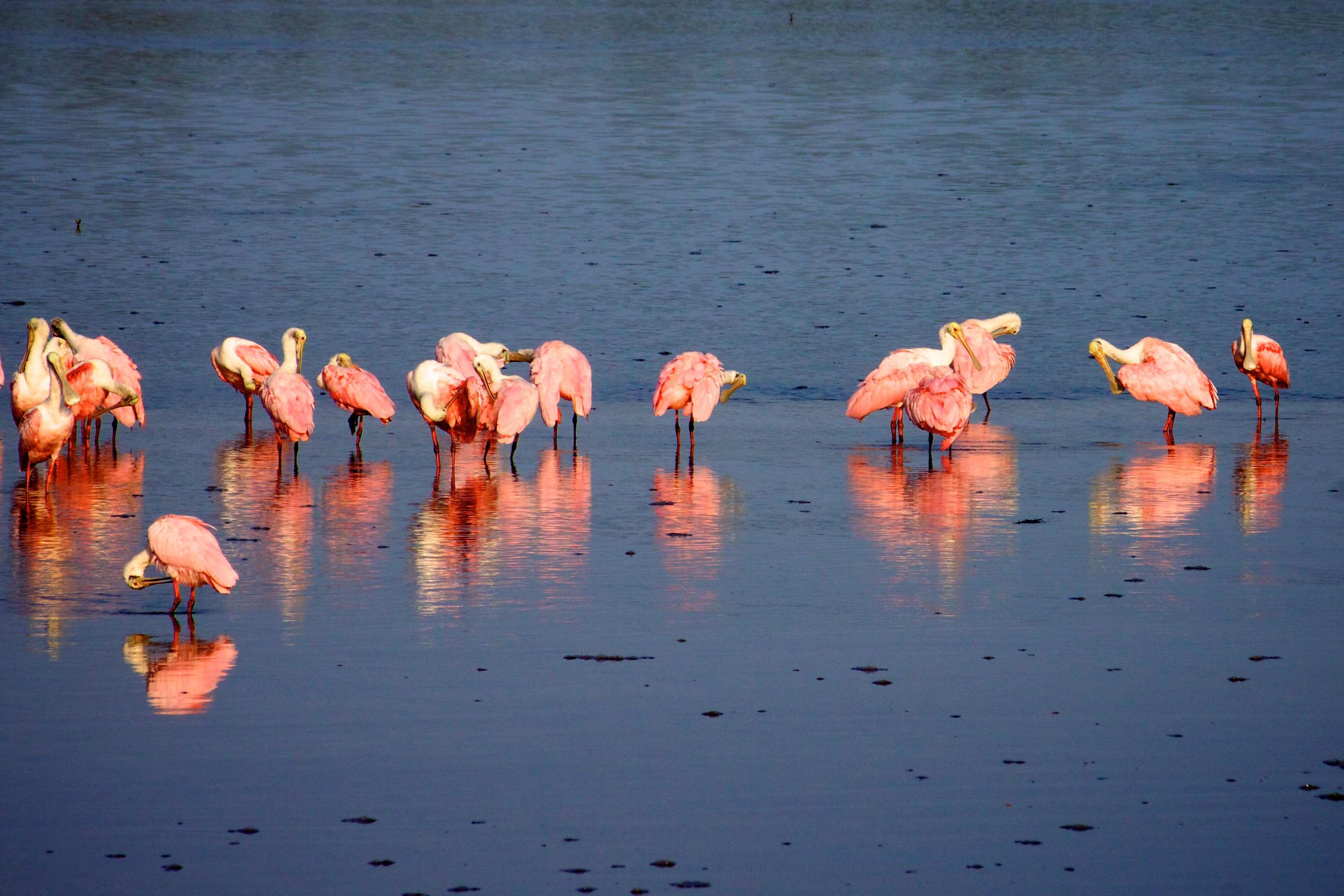
One of the great birding drives in America — the four-mile Wildlife Drive through the J.N. 'Ding' Darling National Wildlife Refuge on Sanibel Island, where the tide pulls back to bare the mudflats and the wading birds come in by the hundreds: roseate spoonbills like flying sunsets, reddish egrets dancing for fish, white pelicans, wood storks, herons and egrets of every kind. Ranger Quinn drives you slowly through the mangrove estuary, tells you what you're looking at and the one trick that makes or breaks the trip — the tide — and points out the alligators, the mangroves, and the birds along the way. Ranger Boone Merrick rides along with the tales: the newspaper cartoonist named Ding Darling who drew a duck, invented a stamp, and quietly saved this island and helped build the whole national refuge system; the Calusa shell kings who ruled this coast without ever planting a crop, and turned back a Spanish conquistador; the shell-hunter's stoop and the one rule that can cost you five hundred dollars; and how the island came back after Hurricane Ian. A slow, gentle, one-way drive — best at LOW TIDE, in the cool months, closed Fridays. Bring binoculars, patience, and a full memory card.
 Driving tourCarPlay
Avenue of the Giants (California)
27 stops· 43 min· 30.5 mi
 Driving tourCarPlay
Gulf State Park
28 stops· 51 min· 10.0 mi
Alabama's stretch of the Gulf of Mexico — six thousand acres of sugar-white sand, dune lakes, and maritime forest wrapped around one of the most storm-tested state parks in America. Ranger Quinn drives you from the great record-setting fishing pier, past the resilient beachfront Lodge, up along the freshwater lakes hiding just behind the dunes, and east down the coast to the dramatic inlet at Perdido Pass. Along the way, Ranger Boone Merrick tells the tales: the sugar-white sand that rode down from the Appalachian Mountains, the tiny endangered beach mouse that lives nowhere else on earth, the loggerhead turtles that crawl ashore in the dark, the Civilian Conservation Corps boys who built this park in the Depression, the guns of Fort Morgan and 'Damn the torpedoes,' and the long story of a coast that keeps getting knocked flat by hurricanes — and keeps coming back. Bring sunscreen, and watch the water.
 Driving tourCarPlay
Palms to Pines Scenic Byway
25 stops· 51 min· 62.4 mi
Sixty-two miles from the palm-lined desert floor of Palm Desert to the pine forests of the San Jacinto Mountains and down the far side to Banning — one of Southern California's great scenic drives, and one of the most dramatic changes of scenery you can make in a single afternoon. Ranger Quinn takes you up the old Pines to Palms Highway, Route 74, as it climbs off the Coachella Valley floor through a wall of desert mountains, past the Cahuilla overlooks and the pinyon woods and the high green meadows of Garner Valley, to the mile-high mountain village of Idyllwild — then makes the one turn of the whole drive and rolls back down Route 243 to the windy pass at Banning. It's a vertical journey through five different worlds: Sonoran desert to mountain chaparral to pinyon-juniper to towering yellow pine, all in an hour's drive. Ranger Boone Merrick rides along with the tales: Tahquitz, the banished shaman the Cahuilla say still streaks across these peaks as a ball of green fire; the record-breaking masonry dam that made Lake Hemet; the hand-built road itself, and the horseback years before it; and the Ramona Pageant down in the valley, the longest-running outdoor play in America. Best from fall through spring, when the desert is cool and the mountains are clear. The high country gets snow and chain controls in winter, so check conditions before you climb — then go up.
 Driving tourCarPlay
M-22 South: Manistee to Empire (Michigan)
25 stops· 40 min· 51.8 mi
 Driving tourCarPlay
Multnomah Falls and the Waterfall Loop
24 stops· 41 min· 32.1 mi
A self-guided audio driving tour of the Columbia River Gorge waterfalls with Ranger Quinn — the wall of falls on the Historic Highway, the crown jewel Multnomah with its short walk to Benson Bridge, the easy stroll to Lower Latourell, and campfire tales from Ranger Boone Merrick.
 Driving tourCarPlay
Cades Cove: The Smokies' Lost Valley
26 stops· 49 min· 10.6 mi
An eleven-mile, one-way loop around the most beloved valley in the Great Smoky Mountains — a broad, green cove ringed by peaks, dotted with log cabins, three white churches, and a working grist mill. Ranger Quinn walks you through the ground itself: why this valley is flat and fertile when everything around it is mountain, how a War of 1812 veteran and his wife survived their first winter here in 1818, and how a thriving community of nearly seven hundred people was bought out and moved off to build America's most-visited national park. Ranger Boone Merrick rides along with tales of the pro-Union cove in a Confederate state, the bears that stop traffic, moonshine and the men who chased it, and the family who fought the park all the way to Christmas Day 1937. Drive it slow. Every cabin has a door you can walk through.
 Driving tourCarPlay
Moonshiner 28
23 stops· 40 min· 55.9 mi
Sixty miles of twisting mountain highway from Deals Gap to Franklin, North Carolina — the old blockade-whiskey country of the far Smokies, and the third of the three legendary roads that meet at Deals Gap, alongside the Tail of the Dragon and the Cherohala Skyway. Ranger Quinn keeps you oriented and safe and tells you what you're seeing — Fontana Lake, the Nantahala gorge, the largest national forest in the state, and the gem country around Franklin. Ranger Boone Merrick brings the tales this road was named for: why these hidden coves ran with moonshine, the outlaw they called the King of the Moonshiners, how running liquor on roads like this one birthed stock-car racing, the mountain towns drowned to build Fontana Dam and the broken promise called the Road to Nowhere, and a thousand-year-old Cherokee mound that finally came home in 2026. Drive it either way. Fuel up first — the services are thin out here. Then roll.
 Driving tourCarPlay
Belle Isle — Detroit's Island in the River
20 stops· 41 min· 6.7 mi
Some of America's great parks sit right in the middle of its cities — this is one of them. A self-guided driving loop around Belle Isle, Detroit's 982-acre island in the river, the second-most-visited state park in America and one almost nobody outside Michigan knows the story of. In one easy counterclockwise loop you'll pass a scandalous marble fountain a disliked millionaire bribed the city to build; the oldest aquarium in the country and a glass-domed conservatory of orchids, both from 1904; and the only marble lighthouse in the United States out at the island's tip. Along the south shore, Canada sits a mile across the water — the same river that was the last line to freedom on the Underground Railroad, and, a lifetime later, the busiest smuggling channel of Prohibition, whiskey running across the ice by car. The loop closes with the island's own comeback: a bankrupt city that refused to give up its crown jewel. Ranger Quinn drives you through it; Ranger Boone Merrick tells the deep stories. The island is free to walk or bike (a small Recreation Passport covers your car); the tour works fully offline. Designed in the 1880s by Frederick Law Olmsted — the same hand behind Central Park and the Niagara Reservation, the very first state park in America.
 Walking tour
Lost Maples: The Ice-Age Forest of the Texas Hill Country
20 stops· 35 min· 4.5 mi
Deep in the Texas Hill Country, hidden in the cool limestone canyons of the Sabinal River, grows a forest that shouldn't be here at all — a stand of bigtooth maples left stranded when the Ice Age ended, that every autumn sets these canyons ablaze in red and orange and gold, the finest fall color in all of Texas. Ranger Quinn walks you the whole East Trail loop through Lost Maples: past the flaming maples and the clear green river pools, up a steep climb to a Hill Country overlook, and back down through the wild uplands, telling you the maples, the birds, the rock, and the reasons all along the way. Ranger Boone Merrick walks with you too, with the tales this canyon keeps — how these maples came to be 'lost' here ten thousand years ago and never left; the raw and bloody frontier this Hill Country once was; and the legend of the lost silver mine that has drawn treasure-hunters into these hills for two hundred years. It's a real hike — four and a half miles with a stiff climb — so bring water, sturdy shoes, and a reservation in the fall, and come in late October or November if you can, for the color.
 Driving tourCarPlay
The Whiteface Memorial Highway
21 stops· 36 min· 20.3 mi
Twenty miles from the Olympic village of Lake Placid to the wind-scoured summit of Whiteface Mountain — one of the great fall-foliage drives of the Northeast, climbing the fifth-highest peak in New York on a road built to honor a generation of soldiers. Ranger Quinn takes you out of Lake Placid, up the Ausable River gorge through the Wilmington Notch, and then up the Whiteface Veterans Memorial Highway itself — five switchbacking miles and two thousand feet of climb to a granite castle just below the clouds, where an elevator bored into the heart of the mountain lifts you to a summit with a hundred-mile view of the Adirondack High Peaks. Ranger Boone Merrick rides along with the tales: the Miracle on Ice, when a team of American college kids beat the unbeatable Soviets right here in 1980; the road itself, dreamed up by a governor named Franklin Roosevelt to remember the fallen of the First World War; the abolitionist John Brown, who chose to be buried in these mountains; and how a Mohawk insult gave the whole range its name. Best in late September and early October, when the High Peaks catch fire. The highway is seasonal and tolled — check it's open before you climb. Then go up.
 Driving tourCarPlay
Assateague Island: The Wild Shore
20 stops· 35 min· 4.8 mi
A wild barrier island off the Maryland coast where the horses run loose on the beach. This self-guided driving tour rides with you from the Assateague Island Visitor Center, over the Verrazano Bridge, and down the island's one long road — with two park rangers in the car. Ranger Quinn keeps you oriented and safe and tells you what you're looking at: how a barrier island builds itself and walks toward the mainland, the life of the dunes, the marsh, and the loblolly forest, and how to share the road with wild horses. Ranger Boone Merrick brings the tales: where the ponies really came from, the ghost city that developers tried to build here before a single storm erased it, the surfmen who rowed out into shipwrecks, and the pony swim that a little book made famous. Three short walks, one unforgettable island. Watch both shoulders for horses — and keep your distance.
 Walking tour
St. Augustine: The Ancient City
20 stops· 25 min· 3.2 mi
Walk the oldest city in America. Founded by the Spanish in 1565 — forty-two years before Jamestown, fifty-five before the Pilgrims — St. Augustine has been lived in without a break for four and a half centuries, and every one of them has left something in these narrow streets. Ranger Quinn walks you through the whole of it on foot: the Castillo de San Marcos, a fort built of seashell stone that no enemy ever took; the pedestrian lanes of the old Spanish town; the plaza that has been the city's heart since 1573; and the fairy-tale hotels a Gilded-Age tycoon named Henry Flagler raised here in the 1880s. Ranger Boone Merrick rides along with the tales this ancient city has kept — and it has kept some dark and glorious ones: the founder who built a city and stained a bay with blood, the fort that swallowed cannonballs whole, the sea-dog Francis Drake and the pirates who burned the town, the old dream of a fountain of youth, the heartbroken millionaire and the church he built for his daughter, and Fort Mose, the first free Black town on this continent. It's a flat, easy walk in the kind of mild winter weather the North can only dream of — comfortable shoes, and let's step back four hundred years.
 Driving tourCarPlay
Delaware Water Gap: The Valley That Wouldn't Drown
19 stops· 35 min· 27.4 mi
The place where the Delaware River saws straight through a mountain — and the valley America tried to drown and never did. This self-guided driving tour runs the Pennsylvania side of the Delaware Water Gap, from the great notch in the ridge north past a string of the finest waterfalls in the East to the old river town of Milford. Ranger Quinn keeps you oriented and safe and tells you what you're seeing — how the river cut the Gap, the falls, the eagles and shad of the last great wild river in the East. Ranger Boone Merrick brings the tales: the enormous dam the government began here in the nineteen-sixties, the thousands of families it forced off their land by eminent domain, the reservoir that was never filled, the hippies who squatted the emptied farmhouses, the old Lenape homeland and the swindle that took it, and a road older than the country. Three short waterfall walks, one river that would not be tamed. Wear your life jacket near the water — and roll north.
 Walking tour
Ricketts Glen: The Falls Trail
18 stops· 36 min· 6.6 mi
Deep in the mountains of northeastern Pennsylvania, two branches of a mountain creek tumble off the edge of the Allegheny Front in a staircase of waterfalls — twenty-one of them, one after another, the tallest a ninety-four foot curtain of water called Ganoga Falls. This is the Falls Trail at Ricketts Glen, rated by many the single finest waterfall hike in the eastern United States, and it is the whole reason you came. Ranger Quinn walks you the entire famous loop — up the lower glen past the first falls, up through Ganoga Glen to the great falls themselves, across the high old-growth forest, and down the wild, steep Glen Leigh — naming every fall, reading the ancient rock and the five-hundred-year-old trees, and above all keeping you SAFE on a trail that has taken lives. Because this is the truth about Ricketts Glen: it is breathtaking, and it is dangerous. It is Pennsylvania's 'most difficult' trail — seven-plus miles and nearly a thousand feet of wet, slick stone steps cut into the cliffs beside the water. Wear real hiking boots, stay on the trail, keep well back from every edge, and you will have the hike of your life. Ranger Boone Merrick walks with you too, with the true stories this glen keeps — the Gettysburg hero and lumber baron who bought this mountain to cut it down, and couldn't; the five men who spent four years hand-cutting these steps into the cliffs; and the names, carried on the water, of the nations who came before. Come in fall for the color, wear the boots, and take your time. The glen has been here a long time. It will wait for you.
 Driving tourCarPlay
The Apache Trail: Superstition Country
18 stops· 37 min· 13.4 mi
One of the great scenic drives of the American Southwest — the paved heart of Arizona's historic Apache Trail, climbing out of the desert east of Phoenix into the wild, cliff-walled Superstition Mountains, the range that has swallowed more lost-gold seekers than any other in America. Ranger Quinn takes you up State Route 88 from the old gold-boom town of Goldfield, past Lost Dutchman State Park under the towering Superstition wall, along the blue water of Canyon Lake, to the tiny frontier outpost of Tortilla Flat — a town of six people that is the last stagecoach stop on the trail. Along the way you'll learn the volcanic story written in these cliffs, the saguaro-and-flash-flood truths of the Sonoran Desert, and the astonishing history of the road itself — a freight road hand-built through solid rock in 1905 to raise the first great dam of the American West. Ranger Boone Merrick rides along with the legends this mountain is soaked in: Jacob Waltz, the Dutchman, and the golden mine no one has ever found; the treasure hunters who walked into these canyons and never walked out; the massacre that may never have happened; and the guardian the Apache say the outside world invented. A paved out-and-back to Tortilla Flat — best from November through April, when the desert is cool. The trail beyond Tortilla Flat is closed and unpaved, so we turn around there — check az511 before you go, and bring water. Then head for the hills.
 Driving tourCarPlay
Tail of the Dragon
18 stops· 27 min· 9.3 mi
Eleven miles. The famous count of three hundred and eighteen curves. No stoplights, no driveways, no straight worth the name — just US-129 writhing across the Tennessee–North Carolina line at Deals Gap, the most legendary stretch of asphalt in the eastern United States. Ranger Quinn rides shotgun to keep you safe and pointed the right way — the speed limit's thirty and heavily enforced, the double-yellow is sacred, and the views are worth the pull-offs. Ranger Boone Merrick brings the tales: the crash-part shrine called the Tree of Shame, the dam where Harrison Ford took the leap in 'The Fugitive,' the Cherokee who never left these mountains, the giant that powered the atom bomb, and how a nameless mountain road became the Dragon. Drive it in either direction — we've got you both ways. Watch the centerline, and enjoy the ride.
 Walking tour
Gateway Arch National Park — The Myth and the Ledger
17 stops· 40 min· 1.6 mi
A self-guided walking tour of Gateway Arch National Park — the smallest national park in the country, and the only one built around a monument you already know on sight. A flat, paved, mile-and-a-third loop carries the whole story of America's westward dream and the price of it: the silver curve of Eero Saarinen's six-hundred-and-thirty-foot Arch; the Old Courthouse where Dred and Harriet Scott sued for their freedom; the 1764 founding block and its Old Cathedral, the one building spared when the riverfront was cleared; the vanished earthworks of Mound City; and the Mississippi levee that was the real gateway west. Ranger Quinn guides; Ranger Boone Merrick tells the deep stories — Dred and Harriet Scott, the setting of the keystone, the lost mounds, and the night the river burned. The grounds are free and open from five in the morning to eleven at night, the path is level and easy underfoot, and the tour works fully offline and walks the loop in either direction.
 Walking tour
Vancouver Barracks — Parade Ground Walking Tour
18 stops· 21 min· 2.7 mi
Discover the history of the Vancouver Barracks Parade Ground on this self-guided walking tour.
 Driving tourCarPlay
Myakka River: Florida's Wild Heart
17 stops· 30 min· 3.7 mi
A slow drive into one of the wildest and oldest of Florida's state parks — Myakka River State Park, thirty-seven thousand acres of river, lake, prairie, and oak hammock just east of Sarasota, and one of the finest places in all of Florida to see alligators and wading birds in the wild. Ranger Quinn drives you up Park Drive, past the old stone weir where the gators gather, along the blackwater Myakka River, to the Canopy Walkway where you can climb into the treetops, and out to the great sheet of Upper Myakka Lake — the 'River of Birds,' where spoonbills and wood storks and herons feed by the thousand. Ranger Boone Merrick rides along with the tales: the young men of the Civilian Conservation Corps who carved this park out of the wilderness by hand in the depths of the Depression; Bertha Palmer, the Chicago society queen who stepped off a train and bought a county's worth of wild Florida; the two giant airboats that ruled the lake for thirty-six years; and the deep sinkhole at the far end where the alligators pile up by the hundreds. Best in the cool dry season, November through April, when the wildlife crowds the water. There's a small park entry fee; bring binoculars and water — and never, ever feed a gator.
 Walking tour
Palm Canyon: The Cahuilla Oasis
15 stops· 24 min· 1.0 mi
A walk into a green miracle in the desert — Palm Canyon, in the Indian Canyons, the sacred ancestral home of the Agua Caliente Band of Cahuilla Indians, just above Palm Springs. Down in this rocky canyon runs a creek, and along it stands one of the largest oases of native California fan palms on Earth — thousands of them, shaggy and towering, shading a cool green ribbon of water through a furnace of a desert. Ranger Quinn walks you from the Trading Post overlook down into the palm grove and along the creek, telling you the remarkable natural story of the palms, the water, and the fire that shapes them. Ranger Boone Merrick walks along with the true history this canyon holds: the small nation that gated its own sacred land to keep control of it; the early Hollywood crews who turned the oasis into a movie jungle and set the palms alight; and the strange checkerboard of land that still defines Palm Springs today. And through it all runs one clear truth: this is not a ruin or a relic — it is the living heart of a sovereign people who have cared for these palms since time immemorial, and who own and protect them still. A short, easy, shaded walk, best October through April. There's a tribal admission fee at the gate; leave the dogs at home, tread gently, and come see one of the desert's true wonders.
 Walking tour
Silver Falls — Maple Ridge Loop
15 stops· 31 min· 2.6 mi
A self-guided walking tour of the South Falls and Maple Ridge loop in Silver Falls State Park, Oregon — a 2.6-mile loop down the Canyon Trail to two waterfalls you walk behind, South Falls and Lower South Falls, then a climb home up the Maple Ridge Trail through the bigleaf maples past little Frenchie Falls. Ranger Quinn guides on foot; Ranger Boone Merrick tells the canyon's old stories at the campfire stops.
 Walking tour
Muir Woods: A Walk Among the Ancients
14 stops· 31 min· 2.4 mi
A walk back into deep time — through one of the last old-growth coast redwood forests on Earth, tucked in a fog-fed canyon just twelve miles north of the Golden Gate. Ranger Quinn guides you on foot up the main trail along Redwood Creek and back down the Hillside Trail: the tallest living things on the planet, some of them well over a thousand years old, standing in a cathedral hush while a salmon stream runs at their feet. You'll learn how a redwood drinks the fog, why fire only makes it stronger, and how to read a family circle of trees grown from a single fallen giant. Ranger Boone Merrick rides along with the tales this grove has earned: the wealthy couple who bought the canyon to save it from a dam and then refused to put their own name on it; the gentle, wild-haired man it was named for instead; and the spring day in 1945 when the diplomats building the United Nations came here, into the trees, to mourn a president. It's an easy, mostly level walk on a paved path — bring a light jacket, because it's cool and damp under the canopy, and remember your parking or shuttle reservation, because you cannot just drive up to Muir Woods.
 Driving tourCarPlay
Highlands Hammock: Florida's First State Park
14 stops· 16 min· 3.3 mi
A slow drive through a piece of Florida the way it looked a thousand years ago — Highlands Hammock, one of the oldest state parks in Florida and one of the last great stands of virgin subtropical forest left anywhere. Ranger Quinn drives you around the park's famous three-mile Loop Drive, beneath ancient live oaks and towering cypress, past the old catwalk over the alligator swamp, telling you what lives in this wild green tangle and how it works. Ranger Boone Merrick rides along with the tales: the remarkable woman of the Brooklyn-Bridge family who spent a fortune to save this forest from the saw; the young men of the Depression-era tree army who built these trails by hand and hungry; and the thousand-year-old oaks that were nearly lost and are still standing. Come in the cool months, drive slow with your windows down, and watch for gators — this is Old Florida, still breathing.
 Driving tourCarPlay
High Point: The Roof of New Jersey
13 stops· 16 min· 2.9 mi
A drive to the literal top of New Jersey — up the Kittatinny Ridge to High Point, 1,803 feet up, where a great stone obelisk stands against the sky and three states roll out below you in every color of autumn. Ranger Quinn drives you up the scenic road from the park gate, past the highest lake in the state to the foot of the monument and out along the ridge, telling you how this high, wild corner of New Jersey works and what to look for as the leaves turn. Ranger Boone Merrick rides along with the tales: the millionaire couple who bought a mountain and gave it to the people; the 220-foot tower they raised to the state's war dead; and the strange, ancient bog near the summit that has no business being up this high. Come in October if you can — but on a clear day, any season, the view from the top of New Jersey is one you don't forget.
 Driving tourCarPlay
Palo Duro Canyon: The Grand Canyon of Texas
16 stops· 33 min· 10.5 mi
They call it the Grand Canyon of Texas, and standing on the rim, you'll see why: the flat, endless Panhandle plains simply crack open at your feet into a thousand-foot gorge of banded red and orange rock, the second-largest canyon in the United States. Ranger Quinn drives you down the winding road the Civilian Conservation Corps carved into the canyon in the 1930s, along the little river that cut the whole thing, out to the trailhead for the Lighthouse — the great stone spire that is the symbol of the Texas Panhandle. Ranger Boone Merrick rides along with the tales this canyon has kept, and they are some of the biggest in the West: the young men who built this park by hand in the depths of the Depression; the terrible autumn day in 1874 when the free life of the Comanche and Kiowa ended here; the ancient stronghold this sheltered canyon has always been; and Charles Goodnight, the old cattleman who built an empire on its floor. Bring water and a hat — the Lighthouse hike is long and shadeless — and come in the cool half of the year, because this canyon is a furnace in high summer.
 Walking tour
Swallow Falls: Maryland's Old-Growth Gorge
12 stops· 15 min· 0.9 mi
A walk into the wild green heart of western Maryland's mountains — Swallow Falls, where the Youghiogheny River tumbles over four waterfalls in a single mile through one of the last virgin forests left in the state. Ranger Quinn walks you around the Canyon Loop past Muddy Creek Falls, the tallest waterfall in Maryland, and under hemlocks that were old when the country was young. Ranger Boone Merrick rides along with the tales: the railroad family who saved this forest from the saw; the ancient trees that somehow escaped the axe; and the summer the richest, most famous men in America — Henry Ford and Thomas Edison among them — pitched their tents right here by the falls. Come in October, when the whole gorge burns gold and red over the white water — but any day, the sound of these falls and the hush of these old trees will do you good.
 Drive + walkCarPlay
Beacon Rock: The Rock That Refused to Fall
23 stops· 38 min· 7.2 mi
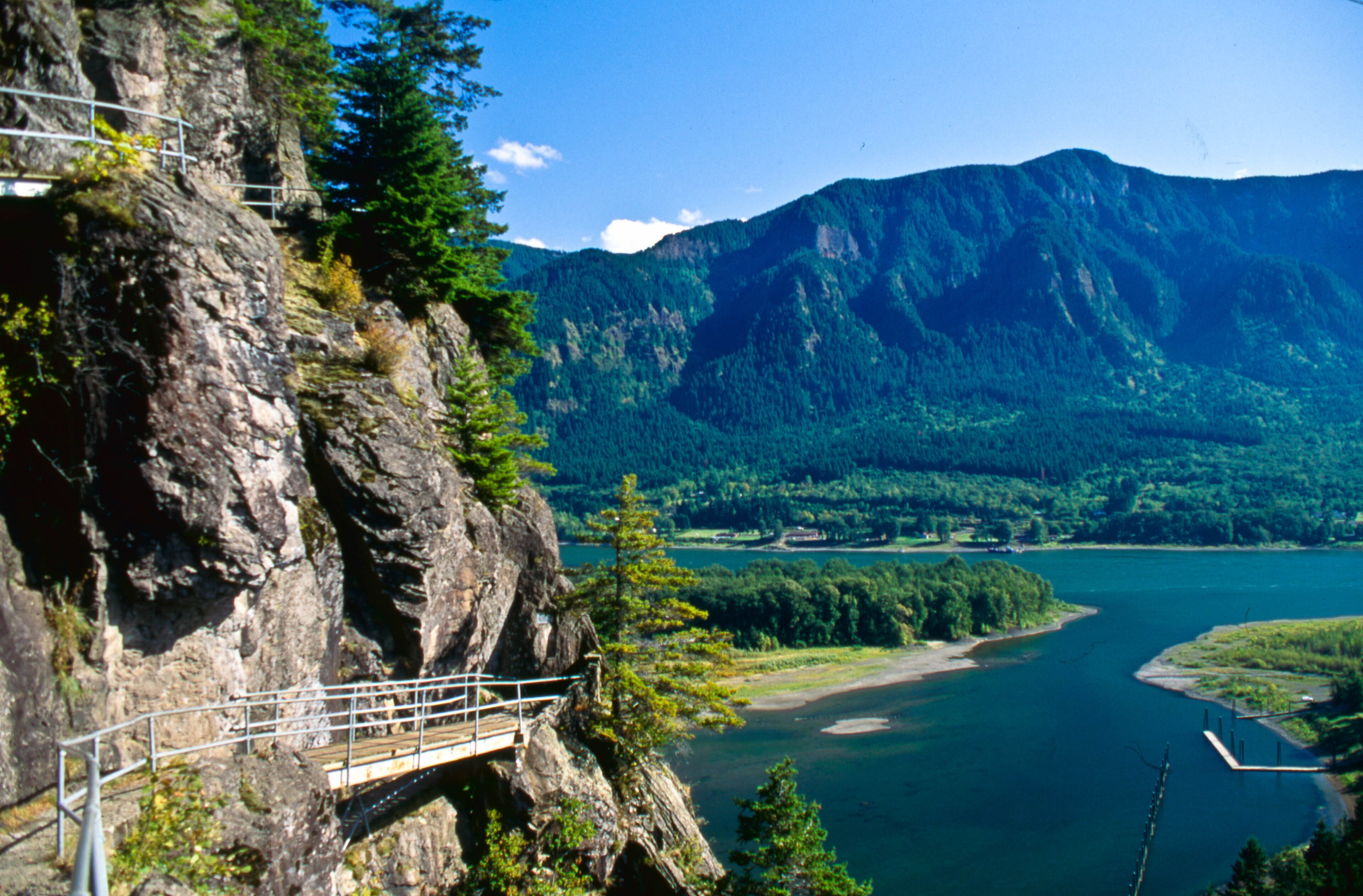
An eight-hundred-foot core of an ancient volcano standing guard over the Columbia River Gorge — and one of the most remarkable trails in America clinging to its sheer face. Ranger Quinn walks and drives you through Beacon Rock State Park on Washington's WA-14: the great monolith Lewis and Clark named in 1805, the man who bought it to save it from the dynamite, and the impossible switchback catwalk he carved up its cliffs by hand. You'll climb Beacon Rock itself — fifty-two switchbacks and twenty-two bridges to a summit with the whole gorge at your feet — and cross the highway to walk into a mossy side-canyon to the Pool of the Winds, where a waterfall roars through a slot in the rock and blows mist back in your face. Ranger Boone Merrick rides along with the tales: the crews who nearly blew the rock to gravel, Henry Biddle's three-year obsession, and the old gorge legend of the Bridge of the Gods. Bring good shoes and a Discover Pass.
 Driving tourCarPlay
Goliad: The Mission, the Presidio & the Massacre
9 stops· 11 min· 1.1 mi
A short drive through one of the most beautiful and most heartbreaking places in Texas — Goliad, where a whitewashed Spanish mission and a stone fortress stand a mile apart on the San Antonio River, and where one of the darkest days of the Texas Revolution unfolded. Ranger Quinn walks you through the reconstructed Mission Espíritu Santo, once the greatest cattle ranch in Spanish Texas, and down to Presidio La Bahía, the only fully rebuilt Spanish colonial fort in the Western Hemisphere. Ranger Boone Merrick carries the harder tales, told with the gravity they deserve: the Goliad Massacre of Palm Sunday, 1836, when Colonel Fannin and more than three hundred surrendered men were put to death, and the cry of 'Remember Goliad!' that helped win Texas its freedom; the Angel of Goliad, a Mexican woman who risked everything to save some of them; and a baby born inside these walls who grew up to become the hero of Cinco de Mayo. Come with an open heart — this ground has earned it.
 Driving tourCarPlay
Horseshoe Bend & Glen Canyon: The Bend, the Dam, and the Drowned Canyon
10 stops· 19 min· 9.5 mi
Stand a thousand feet above the Colorado River as it swings through a perfect horseshoe of stone — then drive the high desert country of Page, Arizona, to the great dam that changed this river forever. Ranger Quinn walks you out to the famous Horseshoe Bend overlook, then drives you north on Highway 89: through the youngest town in the region, across one of the highest bridges in America, to Glen Canyon Dam and the vast blue sprawl of Lake Powell. Ranger Boone Merrick rides along with the tales this canyon country keeps — the dizzying drop and the people the edge has taken; a one-armed Civil War major who ran these rivers blind in 1869 and named the canyon for its glens; the drowned wonderland of Glen Canyon, the most beautiful place hardly anyone ever saw, now four hundred feet under the reservoir; and the Diné, the Navajo people, whose land this red country is. It's a short walk on sand to the rim and an easy, gorgeous drive — bring water and sun protection, mind the unfenced edges, and come in the cool half of the year, because this desert bakes in summer.
Where Ranger Tales takes you
Silver Falls State Park
Willamette Valley, Oregon
Oregon's crown-jewel state park — the Trail of Ten Falls threads a mossy canyon past ten waterfalls, four of which you can walk behind.
Explore Silver Falls State Park →Multnomah Falls
Columbia River Gorge, Oregon
A wall of waterfalls along the Historic Columbia River Highway east of Portland — Multnomah, Wahkeena, Horsetail, Latourell, Bridal Veil, and more, strung along one unforgettable drive.
View tour & book →Anza-Borrego Desert State Park
Borrego Springs, California
California's largest state park — a vast Colorado Desert wilderness wrapped around Borrego Springs, from the dramatic Montezuma Grade to palm canyons, badlands, and the giant metal sky-art sculptures.
View tour & book →Gulf State Park
Gulf Shores, Alabama
Alabama's stretch of the Gulf of Mexico — six thousand acres of sugar-white sand, dune lakes, and maritime forest, from the record-setting fishing pier and the storm-tested Lodge to the inlet at Perdido Pass.
View tour & book →Olympic National Park
Olympic Peninsula, Washington
The whole of Washington's Olympic Peninsula on one Highway 101 loop — glacier-capped peaks at Hurricane Ridge, the Hoh Rain Forest, blue Lake Crescent, and seventy miles of wild Pacific coast.
View tour & book →Hocking Hills State Park
Logan, Ohio
Ohio's cave country — six legendary areas along one scenic byway: Old Man's Cave, Ash Cave, Cedar Falls, Rock House, Conkle's Hollow, and Cantwell Cliffs.
View tour & book →Gateway Arch National Park
St. Louis, Missouri
The country's smallest national park — Eero Saarinen's 630-foot Arch on the St. Louis riverfront and the Old Courthouse where the Dred Scott case began, on one paved riverfront loop.
View tour & book →Vancouver Barracks
Vancouver, Washington
The historic parade ground of Vancouver Barracks — a self-guided walk through the U.S. Army's oldest post in the Pacific Northwest, on the Columbia River in Vancouver, Washington.
View tour & book →Tail of the Dragon
Deals Gap, Tennessee–North Carolina
The most legendary 11 miles of asphalt in the eastern U.S. — US-129 at Deals Gap, 318 curves across the Tennessee–North Carolina line, with no stoplights, driveways, or straightaways.
View tour & book →Cades Cove
Great Smoky Mountains, Tennessee
The most beloved valley in the Great Smoky Mountains — an 11-mile, one-way loop past historic log cabins, three white frame churches, and a working grist mill, through open fields grazed by deer, turkey, and black bears.
View tour & book →Cherohala Skyway
Tellico Plains, Tennessee–North Carolina
A National Scenic Byway climbing over 5,000 feet across the Unicoi Mountains — 40+ miles of mile-high overlooks between Tellico Plains, Tennessee and Robbinsville, North Carolina, past Santeetlah and Hooper Bald, Huckleberry Knob, and old-growth forest.
View tour & book →Moonshiner 28
Deals Gap to Franklin, Tennessee–North Carolina
The legendary NC-28 — sixty miles of wild mountain highway from Deals Gap past Fontana Lake and Bryson City to Franklin, through old blockade-whiskey country, the moonshine-running roots of stock-car racing, and some of the Smokies' quietest backroads.
View tour & book →Beacon Rock State Park
Columbia River Gorge, Washington
An 848-foot monolith — the core of an ancient volcano — standing over the Columbia River Gorge, with a dizzying trail of catwalks and switchbacks up its face. At its feet, Beacon Rock State Park spreads out with the popular Hamilton Mountain hike up to Rodney and Hardy Falls, the Pool of the Winds, and miles of forest and river trails.
View tour & book →Muir Woods National Monument
Mill Valley, Marin County, California
One of the last old-growth coast redwood forests on Earth, in a fog-fed canyon just north of the Golden Gate — a flat boardwalk among thousand-year-old giants along a wild salmon stream.
View tour & book →Belle Isle Park
Detroit, Michigan
Detroit's 982-acre island park in the middle of the Detroit River — the largest city-owned island park in the U.S., with an 1888 marble fountain, the nation's oldest aquarium, a glass conservatory, a lighthouse, and skyline views across to Canada.
View tour & book →J.N. "Ding" Darling National Wildlife Refuge
Sanibel Island, Florida
Sanibel Island's mangrove sanctuary — the four-mile Wildlife Drive through one of America's great birding refuges, where roseate spoonbills, reddish egrets, and white pelicans feed on the falling tide.
View tour & book →Horseshoe Bend & Glen Canyon
Page, Arizona
The Colorado River's most famous curve — a 1,000-foot cliff wrapped around a horseshoe meander at Page, plus Glen Canyon Dam and the drowned canyon now filled by Lake Powell.
View tour & book →Palo Duro Canyon State Park
Texas Panhandle
The 'Grand Canyon of Texas' — the second-largest canyon in the country, banded in red rock and crowned by the Lighthouse spire, south of Amarillo.
View tour & book →Lost Maples State Natural Area
Texas Hill Country
A rare stand of bigtooth maples marooned in the Texas Hill Country since the Ice Age — the state's most famous fall color, along the clear Sabinal River near Vanderpool.
View tour & book →The Mohawk Trail
Berkshires, Massachusetts
New England's first scenic highway — Route 2 climbing an old Native trade route through the Berkshire hills, past the Hairpin Turn and Western Summit to the mill town of North Adams.
View tour & book →Whiteface Veterans Memorial Highway
Adirondacks, New York
The road to the top of an Olympic peak — five miles up Whiteface Mountain to a stone castle and a 360° view of the Adirondack High Peaks, above Lake Placid.
View tour & book →Delaware Water Gap
New Jersey–Pennsylvania
Where the Delaware River slices clean through the Kittatinny Ridge — a national recreation area of forested mountains, waterfalls, and river bends on the New Jersey–Pennsylvania line.
View tour & book →Ricketts Glen State Park
Benton, Pennsylvania
Pennsylvania's waterfall wonderland — the Falls Trail threads two glens past 21 named waterfalls, from 94-foot Ganoga Falls down through a hemlock gorge.
View tour & book →Highlands Hammock State Park
Sebring, Florida
One of Florida's first state parks — an ancient oak hammock laced with boardwalks over a cypress swamp, with alligators and some of the oldest trees in the state, near Sebring.
View tour & book →Palms to Pines Scenic Byway
Southern California
One of the great climbs in the West — Highway 74 rising from the Sonoran Desert floor at Palm Desert up into the pine forests and mountain village of Idyllwild.
View tour & book →The Apache Trail
Superstition Mountains, Arizona
Arizona's most storied backroad — historic State Route 88 winding east of Phoenix through the Superstition Mountains, past Canyon Lake and tiny Tortilla Flat to the switchbacks of Fish Creek Hill.
View tour & book →High Point State Park
Sussex County, New Jersey
The roof of New Jersey — the 1,803-foot summit of the Kittatinny Ridge, crowned by the High Point Monument with three-state views across the Delaware Valley.
View tour & book →Goliad State Park & Presidio La Bahía
Goliad, Texas
The cradle of Texas independence — the restored Mission Espíritu Santo and the Presidio La Bahía, where Colonel Fannin's men fell in the 1836 Goliad Massacre that gave the revolution its rallying cry.
View tour & book →Indian Canyons & Palm Canyon
Palm Springs, California
The ancestral home of the Agua Caliente Band of Cahuilla Indians — a string of desert oases just below Palm Springs, where Palm Canyon shelters the world's largest stand of native California fan palms.
View tour & book →Myakka River State Park
Sarasota, Florida
One of Florida's oldest and largest state parks — 58 square miles of wild prairie, hammock, and wetland along the Myakka River, where alligators bask on the banks, wading birds crowd the shallows, and a canopy walkway lifts you into the treetops.
View tour & book →Assateague Island
View tour & book →St. Augustine
View tour & book →Swallow Falls
View tour & book →The Kancamagus Highway (New Hampshire)
View tour & book →Avenue of the Giants (California)
View tour & book →Vermont Route 100
View tour & book →M-22 South
View tour & book →M-22 North
View tour & book →Coronado Trail Scenic Byway
View tour & book →A ranger in the passenger seat
Ranger Tales is a self-guided audio tour app for the outdoors. You pick a park, download the tour, and start driving or walking. As you reach each overlook, waterfall, or trailhead, the story for that spot plays automatically — narrated, not read off a screen.
It's the unhurried, knowledgeable-friend kind of tour: real history and geology, local lore, and the occasional tall tale from Ranger Boone around the campfire. No tour bus, no schedule, no cell signal required.